How Apple’s New Accessibility Features Use AI to Change Everything
Apple is rolling out major accessibility updates for iPhone, Mac, and Vision Pro, using on-device AI to handle live captions, image descriptions, and navigation
I think we often forget how hard simple things can be. You wake up, grab your phone, and scroll through your feed. It's effortless for many of us. But for millions, that same action is a massive hurdle. Apple just dropped a massive update that changes that.
They are leaning hard into on-device AI to bridge these gaps. It's not just a small patch or a minor tweak. This feels like a shift in how they view the core utility of their hardware.
I've looked at the specs and the promises. It's clear they want to make the digital world feel a lot smaller and easier to use. Let's break down what this means for you and your gear.
The story behind the screen
For years, tech giants have treated accessibility as an afterthought. They add a toggle here or a color filter there. It was never the main event. You could tell it was bolted on late in the cycle.
Apple has been different for a while. They have a team that obsesses over this stuff. They want the iPhone and Mac to work for everyone. It's part of their brand DNA at this point.
This year, they decided to stop playing around with basic settings. They brought in the big guns. They are using their custom chips to run heavy AI tasks right on your device. That keeps your data private and makes things fast.
The goal is simple. They want to remove the friction. When you can't see the screen or hear the audio, the phone should do the heavy lifting for you.
What the new AI does
The star of the show is the new live captioning system. It uses on-device speech recognition to caption any video you play. It doesn't matter if the video has built-in captions or not. Your device just makes them happen.
This works on the iPhone, iPad, and even the Idea Pro. It's a huge win for anyone who is deaf or hard of hearing. You won't be left out of the loop on social media or random clips anymore.
Then there is the VoiceOver update. It now uses smarter AI to describe photos in better detail. It tells you what is in the shot with much higher accuracy than before. It's like having a guide in your pocket.
They also updated Voice Control. You can now use natural language to move around your apps. You don't need to memorize weird commands. You just talk to it like you talk to a friend.
The Accessibility Reader is getting a brain boost too. It can now summarize long, messy web pages for you. You don't need to dig through paragraphs of fluff to find the point.
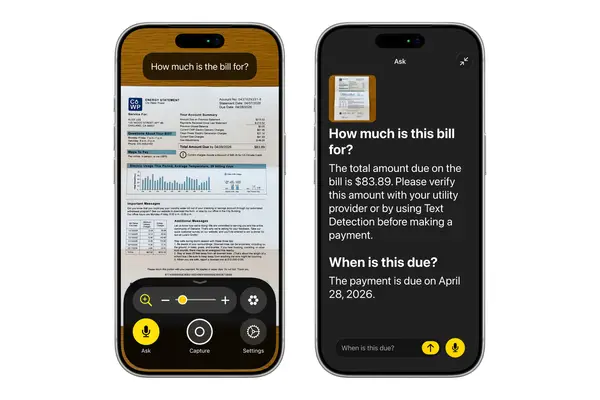
I'm also seeing a cool feature for the Action button. You can ask it questions about what your camera sees. It's a neat way to interact with the world around you in real-time.
The bits and bytes under the hood
All this happens on the chip. They call it on-device AI for a reason. Your voice data and your camera feed don't need to go to a server in the cloud. That's a huge deal for privacy.
The Idea Pro is getting a lot of love here too. They are linking its eye-tracking to power wheelchairs. It lets people control their chair with their eyes. This is the kind of tech that changes lives.
They are also adding Vehicle Motion Cues to the headset. It helps stop motion sickness when you use it in a car. It uses little dots on the screen to show the motion of the vehicle. It sounds weird, but it works.
They also added support for Bluetooth connections for these systems. You can use the Developer Strap for a hardwired link if you need it. It's all about making the hardware talk to other gear seamlessly.
Looking at the bigger picture
Where does this lead us? I think it sets a new bar for the industry. Other firms have to match this or get left behind. Accessibility is no longer a niche project.
It's now a core pillar of product design. When you make tech easier for people with disabilities, you usually make it better for everyone. That's the real secret sauce here.
We'll see more of this in the coming years. As AI gets faster and chips get smaller, these tools will only get sharper. I expect to see even more integration with home tech and cars.
Quick questions answered
Do I need a new device for these features?
Most of these features work on recent models with Apple silicon. If your device supports the latest OS, you're likely good to go.
Is the AI data stored on the web?
No. Apple says the processing happens on your device. Your data stays on your phone or headset.
Does this work for all languages?
It starts with major languages. Apple usually adds more over time, but check your settings for current regional support.
Can I use this on my Apple TV?
Yes. The live captioning features are coming to Apple TV as well, making it easier to watch your favorite shows.
Is there a cost for these updates?
These are standard software updates. They are free for everyone with a compatible device.
My honest take on this
I think this is the most important work Apple is doing right now. We see a lot of hype about AI generating art or writing emails. That's fun, but it's mostly just noise.
This is different. This is about real utility. It's about giving people tools to navigate a world that wasn't built for them. That's what tech should do.
The thing that gets me is how quiet they are about it. They don't scream about "AI" like everyone else. They just integrate it into the tools you use every day. I really respect that approach.
I'm excited to see how the Idea Pro stuff plays out. Linking eye-tracking to a wheelchair is bold. If it works as well as they say, it's a game changer for mobility. I'm betting this is just the start of something much bigger.