TP-Link Archer BE770 Review: Big Speed, Small Ports
We test the TP-Link Archer BE770 Wi-Fi 7 router to see if its blazing wireless performance makes up for a lack of high-speed wired ports.
I just pulled the TP-Link Archer BE770 out of its massive shipping box. It is huge. Most routers hide in the corner, but this one demands a prime spot on your desk. It feels more like a small computer than a piece of home gear.
Wireless tech moves fast these days. We keep seeing new standards pop up every year. Wi-Fi 7 is the current king of the hill, promising speeds that make older gear look like stone tools. The Archer BE770 aims to bring that power to your home.
But does it earn its place? I spent a week pushing it to the limit. I wanted to see if the hype matches the real-world feel. Let's look at what this beast can do.
A tower of plastic and silicon
The design is wild. It has an hourglass shape that makes it look like it belongs in a sci-fi flick. It measures over 11 inches deep. You need a lot of space for this machine. It isn't a subtle device by any means.
TP-Link chose a shiny black finish for the front. It looks cool until you touch it. Fingerprints show up instantly. The sides are silver, and the top has tons of holes for air. Heat management seems to be a priority here.
I set it up on my bookshelf, but it felt cramped. It wants to be the center of attention. If you like gear that looks aggressive, you'll love this. If you prefer minimalist tech, you might want to hide it behind a plant.
What happens when you plug it in
Setting up a router is usually a chore. I used the Tether app on my phone. It took seconds to find the router. I scanned the code on the bottom and followed the prompts. It was fast and simple.
You have to make an admin password right away. Then you pick your network names. I kept the 6 GHz band separate from the others. It makes it easier to keep my high-end devices on the fastest lane possible. The whole process took less than ten minutes.
Once the firmware updated, I was online. The signal strength is impressive. I walked to the far end of my house and still saw full bars on my phone. It handles multiple streams without breaking a sweat.
The 6 GHz performance is where this router shines. I moved some massive files between my PC and a local server. The speeds were insane. It makes moving large games or video files feel instant. You don't realize how much time you lose on slow networks until you try this.
However, the 2.4 GHz band felt a bit weak. My smart light bulbs had a hard time staying connected at the edge of the range. It seems optimized for speed, not for covering every dead zone in a sprawling home.
The wired port problem
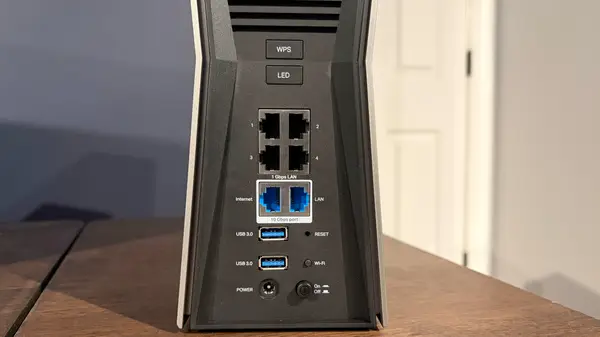
Here is where I get frustrated. The Archer BE770 has two 10 GbE ports. That is great for a fast internet feed. But then they gave us four 1 GbE ports for everything else. Why?
At this price, I expect more. A 2.5 GbE port should be the floor for wired connections. If you have a fast NAS or a high-end desktop, you are stuck with 1 Gbps speeds. That feels like a bottleneck in a Wi-Fi 7 world.
On the bright side, you get two USB 3.0 ports. Most routers only give you one. I plugged in two drives and shared them across the house. It worked perfectly. It is a nice touch for those who want a simple file server.
Final thoughts on the future
This router is a mixed bag. The wireless speed is top-tier. You won't find many routers that can keep up with it in the 5 GHz or 6 GHz bands. It is a beast for gaming and 4K streaming.
But the wired ports hold it back. If you have a wired-heavy home network, you will feel the limits. It is a shame to see such fast wireless tech paired with older wired ports.
I think this is a great buy for people who live on Wi-Fi. If you rely on cables for your main gear, look elsewhere. It is a powerful tool, but it has one foot in the past.
Quick questions answered
Does this support mesh? Yes, it uses TP-Link's EasyMesh. You can link it with other compatible devices to grow your range.
Is the app easy to use? It is very simple. I liked the interface and the setup speed.
Can I turn off the LEDs? Yes, there is a dedicated button on the back. You can also do it in the app.
Is this overkill for most people? Probably. If you have a basic internet plan, you won't see the full benefits of Wi-Fi 7.
Do I need a 10 Gbps internet plan? You don't need one, but it helps. This router is ready for the future of ultra-fast fiber.
My honest take on this
I think the Archer BE770 is a bit of a weird product. TP-Link clearly put all their money into the wireless radios. They work great. I saw speeds that made my old router look like a toy.
But the port layout makes me scratch my head. We are in the era of 2.5 GbE being standard for enthusiast gear. Putting 1 GbE ports on a $400 router feels like a cost-cutting move that hurts the user experience.
I want my hardware to be balanced. If I pay for a high-end router, I want high-end ports on the back. I don't want to buy a switch just to get the speeds I paid for.
Still, if you just want the fastest Wi-Fi possible for your phone and laptop, this is a solid choice. Just know what you are getting into before you drop the cash. I'll be keeping an eye on how TP-Link updates their lineup to fix these port issues.