Android 17 Features: Everything You Need to Know
Get the full scoop on the biggest Android 17 updates, including AI widgets, new emoji, and better ways to share files with iPhone users.
You probably check your phone a hundred times a day. It's the first thing you grab in the morning. So, when Google updates the core system, it matters a lot.
The latest version, Android 17, is finally here. It brings a mix of smart AI tools and simple design tweaks. Some changes are small, but others feel like a big jump forward for daily use.
I've been digging through the details of this release. It's clear that Google wants to make our phones work harder for us. Let's look at what's changing.
Why google is changing the game now
Google holds its big Android Show every spring. This year, they focused on making the OS feel more personal. They want your phone to reflect how you think. It's not just about raw power anymore.
We've seen a change to AI over the last few years. Android 17 leans into this harder than ever. They're using Gemini to handle chores that used to take us time. It's a bold move to put these tools front and center.
The company also knows that people hate clutter. They're stripping away some of the old, clunky menus. Instead, they're adding smooth, quick options that feel natural. It's a clean approach to a complex system.
The big AI upgrades you'll use
The headline feature is definitely Rambler. It's a smart tool for your voice notes and texts. It cleans up your speech in real time. It cuts out those annoying filler words like "um" or "ah."
It's also great at being concise. If you ramble, it fixes your message to be clear and direct. I think this will be a massive help for people who dictate their emails or shopping lists. It even handles multiple languages at once.
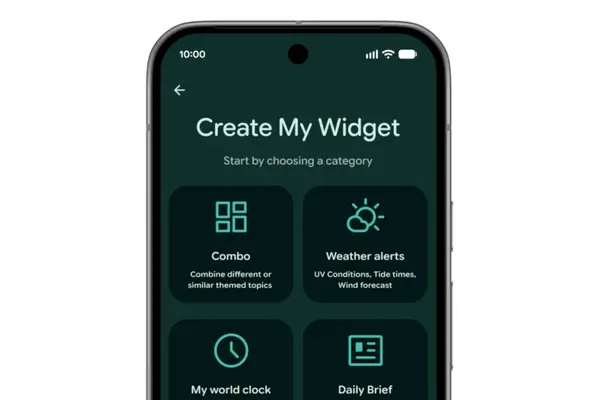
Then there's Create My Widget. This lets you build homescreen widgets using plain English. You don't need to be a coder. Just tell your phone what you want, and it builds the layout for you.
Need a meal planner that focuses on protein? Just ask. Want a weather map for your bike ride? It does that too. It's a fun way to customize your space without the usual headache of widget settings.
Google is also expanding Task Automation. It can now handle more complex chores across your apps. It might order your groceries or plan a trip based on a photo you took. It's trying to be a personal assistant that stays on top of things.
Finally, there's Screen Reactions. This is for the creators who want to make quick videos. You can record your face and your screen at the same time. It's built right into the system, so you don't need extra software to get it done.
Granular details on connectivity and design
Sharing files is finally getting less painful. Google is expanding their Quick Share tool to more phones. It's not just for Pixels anymore. Now, companies like Xiaomi and OnePlus are getting in on the action.
The best part is the bridge to iPhone. If you need to send a file to an iPhone user, your phone can now make a QR code. They scan it, and the file goes straight to their iCloud. It's a smart, simple fix for a long-standing annoyance.
They've also redone the entire emoji set. There are 4,000 new icons. They look 3D now, with more depth and shadow. It's a small visual bump, but they look much better on modern, high-res screens.
Digital health is getting a boost with Pause Point. It's a new tool to stop doomscrolling. If you label an app as distracting, it forces a 10-second wait before you can open it. It even offers breathing exercises to keep you calm.
What this means for your daily routine
These updates show that Google is betting big on AI to save us time. They want to remove the friction of using a smartphone. If your phone can fix your grammar or build a widget for you, you'll spend less time fiddling with settings.
The focus on cross-platform sharing is also huge. No one likes being stuck in a "walled garden." Making it easier to talk to iPhone users is a win for everyone. It makes the whole tech space feel more connected.
I'm curious to see how Pause Point changes usage habits. Will people keep it on? Or will the 10-second timer just become another thing to ignore? It's a bold experiment in how we interact with our own devices.
A few answers to common questions
When can I get Android 17? It starts rolling out to Pixel phones later this year, with other brands following soon after.
Do I need a new phone for these features? Most AI features like Rambler require the latest chips found in newer Pixel and Galaxy models.
Can I turn off the Pause Point timer? You can, but it requires a full phone restart to ensure you really want to disable it.
Does Quick Share work with every iPhone? It works via a web-based QR code link, so any iPhone with a camera can receive files this way.
Are the new emoji available to everyone? They start on Pixel phones, but they will reach other Android devices through later system updates.
My honest take on this
Honestly, I think the AI features are the most interesting part of this update. I've always been a fan of tools that save me time. If Rambler works as well as the demo, I'll be using it every single day for my notes.
The thing that gets me is the focus on "vibe-coded" widgets. It sounds like a marketing term, but it's a great way to make tech feel human. I like that I can just ask for what I need rather than digging through endless menus.
I am a bit skeptical about Pause Point, though. I think most people will just turn it off after a day. It's hard to force yourself to be productive when you really just want to browse the web for five minutes.
Still, I appreciate that Google is trying something different. They aren't just adding more specs. They are trying to solve the problem of digital burnout. I'm eager to see if it works as well as they claim.