Android Auto gets a massive screen upgrade
Android Auto now fits any screen size perfectly, plus adds new AI features, video streaming, and widget support for a better drive.
I remember when car screens were just simple, flat rectangles. You had a basic interface that never changed. It was boring and felt like a relic from the past.
Now, things are different. Car makers are getting wild with screen shapes. We see circles, curves, and even weird trapezoids in new rides. It was a mess for software makers.
Google finally fixed it. They just changed how Android Auto handles these odd shapes. It's a total refresh for your dash.
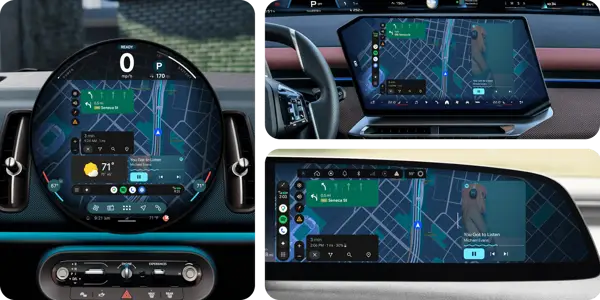
The evolution of the car display
Ten years ago, a screen was just a screen. You didn't worry about pixels or shapes. Every car used the same basic look. It was easy to build apps for that.
But car design moved fast. Now, you see massive screens that wrap around the dash. Some look like tablets glued to the wheel. Others are built right into the curves of the cabin.
Before this update, your phone just pushed a boxy image to the screen. You had big black bars on the sides. It looked like a cheap fix. It was never meant to be permanent.
Google decided to stop fighting the hardware. Instead, they built a system that adapts to any shape. They want the app to look like it belongs there.
How the new interface changes your drive
The big news is what they call "full bleed" design. This means the app takes up every single pixel available. If your screen is a weird shape, the map just flows into the edges.
Patrick Brady, the guy in charge of this, says it was a challenge. He had to look at weird trapezoids and circles. He joked about needing a geometry refresher to get it right.
They didn't stop at just filling space. They added video streaming for when you're parked. I know what you're thinking. Yes, you can watch YouTube while you wait for a charge.
It supports 4K video and fancy sound. You just need to be in park to make it work. The car talks to the phone to unlock the player. It's a smart way to handle safety.
You also get widgets now. Think of your home screen, but for your car. You can see sports scores or smart home buttons right there. It's about keeping your eyes on the road.
Gemini AI is the engine behind these new tricks. You can ask for info using natural talk. It's much faster than tapping through menus while you drive.
Under the hood of the new tech
The design language is changing, too. They call it "Material Three Expressive." It brings bold colors and smooth moves to your car. It matches the look of your phone.
Personalization is the goal here. Your car will pull themes and colors from your phone settings. It makes the whole thing feel like your own space.
The "Magic Cue" feature is another win. It scans your texts and finds what you need. If someone sends an address, it pops up as a button. You just tap it to start the route.
This tech is meant to keep your hands off the phone. By making the car smarter, they hope you stop picking up your device. It's a big win for safety.
What this means for the road ahead
Google is trying to bridge the gap between phone projection and built-in systems. They want the experience to feel the same no matter what. It's a clever way to keep users in their ecosystem.
Even if a car maker doesn't use phone projection, they likely use the native software. Google wins either way. They are building the foundation for almost every modern cockpit.
The new Immersive Navigation in Maps is the final piece. You get 3D buildings and real terrain. It makes the map look like a game, which is honestly pretty cool.
We are seeing a shift in how we view cars. They aren't just for driving anymore. They are becoming mobile hubs for our digital lives.
Quick questions answered
Does this work on all cars? It works on any car that currently supports Android Auto. The screen shape just needs to be supported by the new software update.
Can I watch movies while driving? No. The video player only works when the car is in park. It's a hard limit for safety.
Do I need a new phone? Most modern phones with the latest update will handle these features. Check your settings to see if you have the new version.
How does Gemini help with apps? It acts as an agent. It can open apps like Starbucks in the background to place orders for you.
Is this free? Yes, these are free updates for existing users. You just need to make sure your apps are updated.
My honest take on this
I think this is long overdue. For years, I hated how my phone interface looked on my car screen. It felt like an afterthought. Seeing it finally fill the space makes a huge difference.
The thing that gets me is the AI integration. I'm usually skeptical of voice assistants. But having Gemini do things like place an order is a game changer. It feels useful instead of just a gimmick.
I also love the widget support. I want to see my next meeting or my home thermostat without digging through apps. It makes the dash feel like a real dashboard, not just a screen.
Honestly, my take is that Google is winning the car war. They are making the software so good that no one will want to use the stock systems from car makers. They are just better at this than anyone else.