OpenAI Brings Codex Power to Your Phone
OpenAI adds Codex to the ChatGPT mobile app, letting you control your computer’s code tasks from iOS or Android. See how it works.
I spend way too much time away from my desk. My laptop sits closed while I run errands or grab a coffee. Usually, that means my work just stops. I hate that feeling of being stuck.
Things are changing fast for power users. Now, OpenAI is letting us take control of our desktop code tasks from our pockets. It's a big deal if you write code for a living.
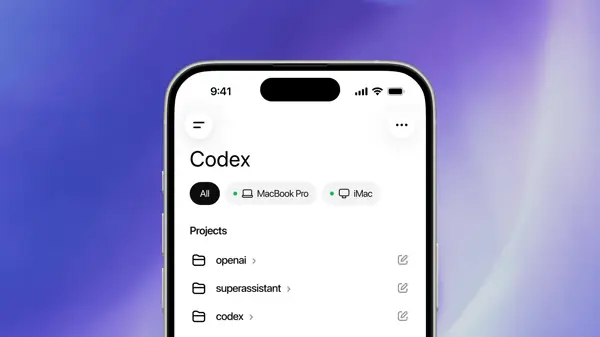
The ChatGPT mobile app is getting a massive upgrade today. You can now talk to Codex right from your phone. It's not just a chat bot anymore. It's a remote control for your machine.
Why this matters for your daily workflow
We've seen a lot of hype around AI lately. Most of it feels like fluff. But Codex has always been different. It does the heavy lifting for devs.
Before this update, you needed to be glued to your seat. You had to watch the terminal output on your screen. You had to be there to click "approve" on every little change. It was a chore.
Now, the ChatGPT app acts as a bridge. It connects your phone to the machine sitting at your desk. You can check your progress while you're out. It's a clean way to stay in the loop.
Think about how much time you waste waiting for scripts to run. You don't have to wait anymore. You can just check your phone and see what happened. It's a huge win for anyone who hates being tied to a chair.
How the codex integration works
So, how do they pull this off? It's pretty simple once you look at the tech. Your phone doesn't do the heavy computation. Your computer still does the real work.
Your macOS machine runs the Codex engine. It keeps your files and your keys safe locally. Nothing sensitive leaves your home or office setup. That's vital for security.
The app acts as a mirror. You see what the code is doing in real time. You get screenshots and terminal logs sent to your phone. It's like having a window into your desktop.
When the code hits a snag, you get a ping. You can see the error on your screen. Then, you can tell the AI how to fix it. You can even approve commands from a park bench.
It's a smart way to handle OpenAI's push into the enterprise space. They want to be the default for work. This mobile bridge helps them get there fast. It makes the "superapp" dream feel real.
The update is hitting all ChatGPT plans right now. Yes, even the free users get a taste. You don't need to pay for the top tier to test it out.
Deep dive into the technical specs
The connection relies on a sync system. It keeps your desktop and phone in lockstep. When a process starts, the phone sends a signal. The desktop starts the task immediately.
You can manage multiple threads at once. If you have a few projects, you can jump between them. It's just like using the desktop app. Everything you do on your phone updates the desktop state.
It handles diffs and test results smoothly. You can see exactly what lines of code changed. If a test fails, you'll know right away. You can push a fix or restart the test.
It doesn't replace your IDE. Don't expect to write full apps on your phone screen. It's meant for management and quick tweaks. It's a tool for oversight, not for heavy lifting.
The future of desktop control
This is just the start. I think we'll see more of this. Soon, our phones will control more of our desktop life. It's a trend I can get behind.
OpenAI is moving fast to beat Anthropic. They lost some ground when Claude Code blew up. Now, they are playing catch-up with this mobile feature. It's a smart move for their bottom line.
They also cut back on side projects. No more Sora distractions. They are focused on making Codex the best tool for work. I think that's the right call for them.
Quick questions answered
Is this only for macOS? Yes, for now. Codex needs the macOS place to run the apps. Windows support isn't here yet.
Does it cost extra? No. It's included in all ChatGPT plans, including the free one.
Is my data safe? Yes. Your files and keys stay on your local machine. The phone only gets a view of the work.
Can I write code on my phone? You can send commands and tweaks. It's not meant for writing whole files from scratch.
Does it work on Android? Yes. The feature is rolling out to both iOS and Android users today.
My honest take on this
I think this is the most useful thing OpenAI has built in a long time. Most AI tools just chat. This one does things. It moves the needle on real work.
The thing that gets me is the speed. I've been testing it all morning. It's responsive. It doesn't feel like a beta test. It feels like a finished product.
I do wonder about the battery drain on my phone. Pinging a desktop for constant updates can't be good for it. I'll keep an eye on that. But for now, I'm sold.
Honestly, my take is that we're moving away from static tools. Everything is becoming a remote service. My computer is just a server now. My phone is the controller. I like it.