Windows 11 Taskbar Tweaks Are Finally Here
Microsoft is testing a movable taskbar and a resizable Start menu for Windows 11. Here is what you need to know about these changes.
I still remember the day I updated to Windows 11. It felt clean, sure, but it also felt like a cage. The taskbar was locked in place like a statue. I wanted to move it to the side of my screen where it belongs.
Most of us have our own ways of working. I like my icons on the left. You might like yours on the bottom. Why should a billion-dollar company tell us where to put them? It feels like they finally heard our complaints.
Now, things are changing. Microsoft is testing a new way to handle the desktop. It's not just a small patch. It's a real shift in how we interact with our own machines.
How we got stuck with a locked taskbar
When Windows 11 first launched, it was a weird mix of new ideas and old walls. The design was pretty, but it took away features we used for years. Moving the taskbar to the top or side was just gone. People were mad.
The company said they built the new taskbar from scratch. They claimed it was too hard to keep the old, flexible code. It sounded like an excuse to most of us. We wanted our freedom back, even if it meant a bit more work for them.
It's funny how these things go. A simple bar at the bottom of your screen dictates your whole flow. If you have a wide monitor, a vertical taskbar saves so much space. Losing that felt like a step back for power users.
The new changes you need to see
Now, Windows 11 Insiders in the Experimental channel get to play with these updates. You can move the taskbar to the top, left, or right side. It finally feels like a real desktop again. You can put it where it fits your style.
The icons move with it, too. If you like them centered, go for it. If you want them left-aligned, that works as well. It's all about giving us the controls we had in the past. It's about time.
They also added a smaller taskbar option. This is great for laptops with small screens. If you have limited space, every pixel counts. Why waste it on a thick bar if you don't need to?
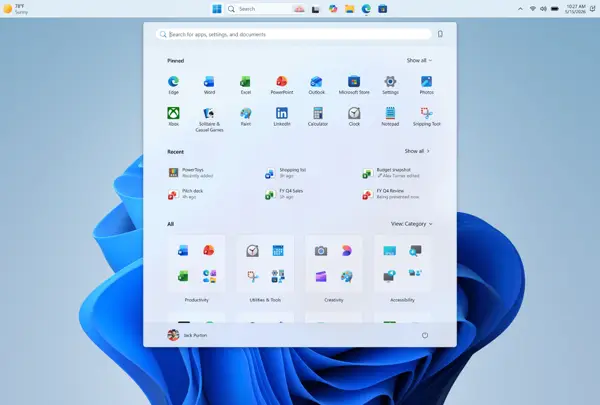
The Start menu is getting some love too. You can now resize it to be small or large. It's not just a fixed box anymore. You can change the layout to suit your habits.
They also added toggles for the Pinned and Recommended sections. If you don't use them, just hide them. It makes the menu look much cleaner. It feels like they are finally listening to what we want.
They are even renaming the Recommended section to Recent. It makes more sense. It shows your latest files and apps. It's a small change, but it's much clearer now.
Technical details for the power user
The update brings more control over your profile data. You can now hide your name and picture from the Start menu. This is great for privacy. If you are sharing your screen for a call, you don't have to show your info.
These features are part of a larger plan to regain user trust. Diego Baca, a design director at the firm, said as much in a blog post. He knows the taskbar is where we spend our time. He knows that's where trust is built.
The rollout is happening in the Experimental channel first. That means it might take a few weeks to reach everyone else. Don't expect it on your stable build today. But at least we know it's coming.
Why this matters for your daily flow
I think this is a big deal. Microsoft is showing they can change their mind. It's not just about adding new features. It's about admitting that some of their earlier choices were wrong.
This shows that feedback works. If enough people shout, they eventually turn the ship around. I hope they keep this up. There are still other parts of the OS that need this kind of polish.
We need more control, not less. A computer should be a tool that fits your hand, not a box you have to adapt to. Hopefully, these changes are just the start of a more open Windows.
Quick questions answered
Can I move my taskbar right now? Only if you are in the Windows 11 Insider program. You need to be in the Experimental channel to see these changes.
Will these features come to everyone? Yes, but it will take time. They usually roll out features to Insiders first before a public release.
Can I really hide the Recommended section? Yes, the new toggles let you turn off the Pinned, Recommended, and All sections in the Start menu.
Why is the name changing to Recent? It's more accurate. The section mostly shows files you just opened or apps you just installed.
Does the smaller taskbar affect performance? No, it just changes the size of the icons and the bar height. It's purely a visual change for space saving.
My honest take on this
I have to say, I'm pretty hyped. I've been complaining about the Windows 11 taskbar since day one. It felt like they were trying to force a tablet layout on a desktop machine.
The thing that gets me is why it took this long. It shouldn't take years to add a feature that was already in Windows 7 or Windows 10. I don't get the internal logic, but I'm glad they are fixing it.
I think this proves that Microsoft is finally waking up. They need power users to stay happy. If they keep stripping away features, people will just look for other options.
My advice? Don't hold your breath for the final release. These things often get delayed or changed. But keep an eye on the updates. We finally have a reason to be optimistic about the future of the desktop.